
Mileage — Reports
Overview
The Mileage Reports screen generates the output documents needed to support the client’s automobile expense deduction on their tax return. The primary output is a CRA-compliant logbook that lists every business trip in the selected period, calculates the total business-use kilometres, applies the applicable CRA per-kilometre rate, and arrives at the total deductible amount. Reports can be broken down by vehicle and exported as a formatted PDF that meets CRA logbook standards.
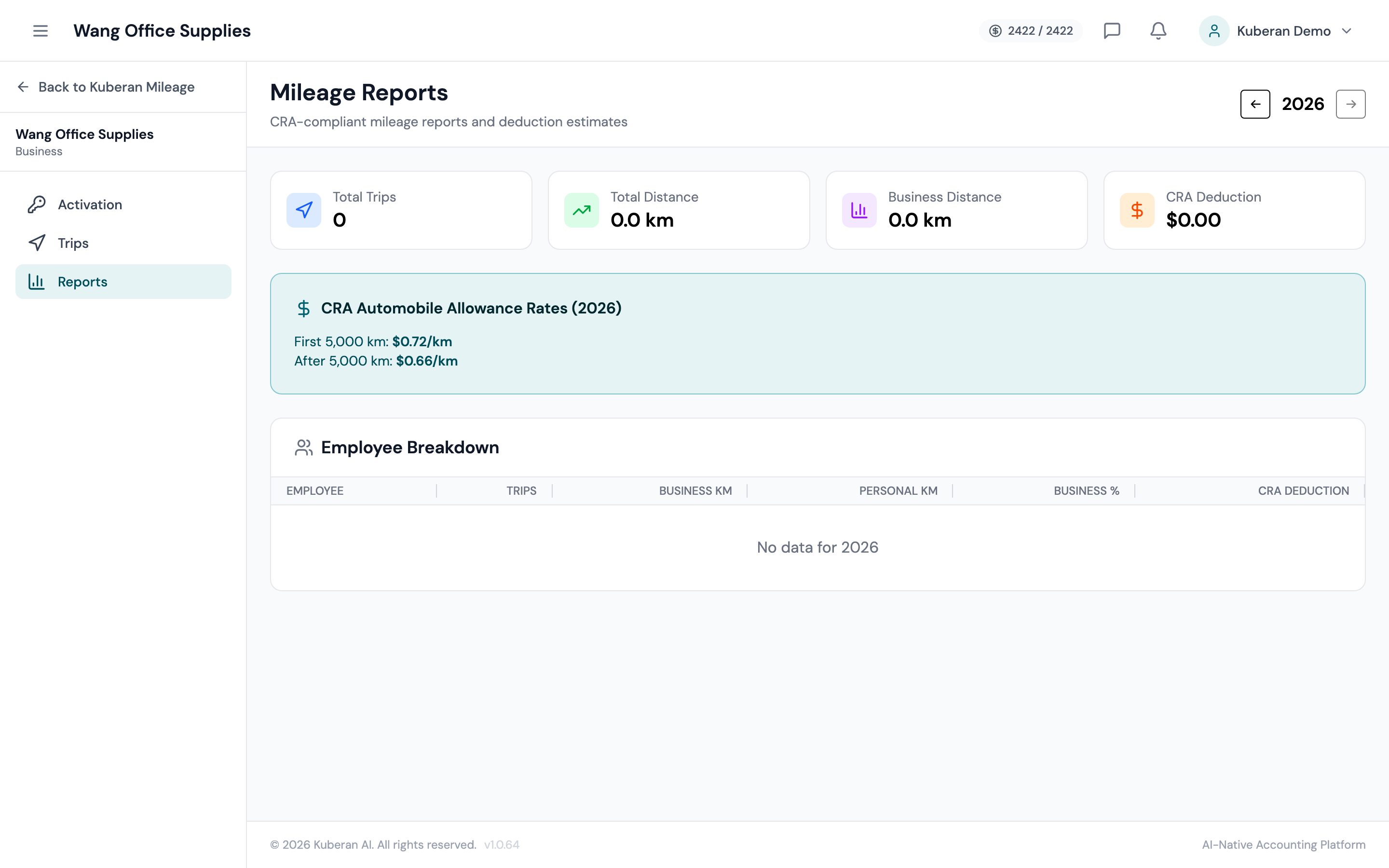
- (1) Date range selector — full year or custom range
- (2) Total business km and total personal km summary
- (3) CRA rate applied and total deductible amount
- (4) Per-vehicle breakdown table
- (5) Export as CRA Logbook PDF and Export CSV buttons
Report Parameters
Select the start and end date for the report. Common presets: Current Year, Last Year, Current Quarter, and Custom. The CRA logbook requirement is annual, so the most common selection is the full calendar year (January 1 to December 31).
Filter to a single vehicle or show all vehicles combined. When All Vehicles is selected, the report displays a combined summary and a per-vehicle breakdown.
When enabled, personal trips are included in the full trip listing section of the logbook PDF. The CRA requires that personal trips be documented to establish the business-use percentage. Enabled by default.
Report Sections
Summary Totals
The summary section at the top of the report shows:
- Total trips — the count of all trips (business + personal) in the period
- Total kilometres — all km driven across business and personal trips
- Business kilometres — km classified as Business purpose
- Personal kilometres — km classified as Personal purpose
- Business-use percentage — (Business km ÷ Total km) × 100. This percentage is applied to the actual automobile expenses to determine the deductible portion on the tax return.
- CRA rate — the per-kilometre rate configured for this client (e.g., $0.70/km for the first 5,000 km)
- Total deductible amount — Business km × CRA rate
Per-Vehicle Breakdown
When the client has more than one registered vehicle, the report shows a separate row for each vehicle with the same totals listed above (total km, business km, business-use %, deductible amount). The combined total appears at the bottom of the table.
This breakdown is important because each vehicle must be tracked and reported separately for CRA purposes — the business-use percentage of one vehicle cannot be applied to another.
Trip Detail Listing
The logbook PDF includes a detailed listing of every trip in the period, sorted by date. Each trip entry shows:
- Date
- Start location
- End location
- Distance (km)
- Purpose (Business or Personal)
- Business reason (for business trips)
- Vehicle used
This detail listing is what constitutes the “logbook” for CRA purposes and is what a CRA auditor would review.
Exporting the Report
Export as CRA-Compliant Logbook PDF
- Set the date range and vehicle filter.
- Click Export Logbook PDF.
- Kuberan AI generates a formatted PDF with:
- Client name and address on the cover page
- Tax year covered
- Summary totals and business-use percentage
- Per-vehicle breakdown
- Full chronological trip listing
- The PDF is ready to download immediately. Provide it to the client for their records and attach a copy to the tax return file.
Export CSV
Click Export CSV to download the trip data as a spreadsheet. The CSV includes every column from the Trips list — useful for clients who want to review the data in Excel, or for loading into tax preparation software.
CRA Mileage Rates
The CRA publishes automobile allowance rates annually. Kuberan AI pre-loads the current year’s rates and applies them automatically. As of the 2024 tax year:
- First 5,000 km: $0.70 per kilometre
- Each km over 5,000: $0.64 per kilometre
- Northern residents: Additional $0.04 per km applies
Rates are updated in January each year. If the client’s situation requires a different rate (e.g., actual-cost method), the rate can be manually overridden in the client’s mileage settings.
Tips
- Keep the logbook current. The CRA requires a contemporaneous logbook — entries recorded at the time of each trip carry more weight than entries reconstructed after the fact. The mobile app makes contemporaneous recording practical.
- Business-use percentage is the key number for the T2125 motor vehicle expenses claim. The logbook PDF makes it easy to find and cite this percentage when preparing the return.
- Representative year: Once a complete logbook has been kept for one year, a client may qualify for the CRA “representative year” method for subsequent years. Consult the CRA guidelines to determine eligibility.