
Payroll — Reports
Overview
The Payroll Reports screen provides a library of standard reports for a client’s payroll. Reports pull data from all processed pay runs and give you a structured view of payroll costs, statutory deductions, vacation liabilities, and year-end filing totals. Each report can be filtered by date range and exported to CSV for further analysis or to PDF for sharing with the client. Reports are generated on demand and always reflect current processed data.
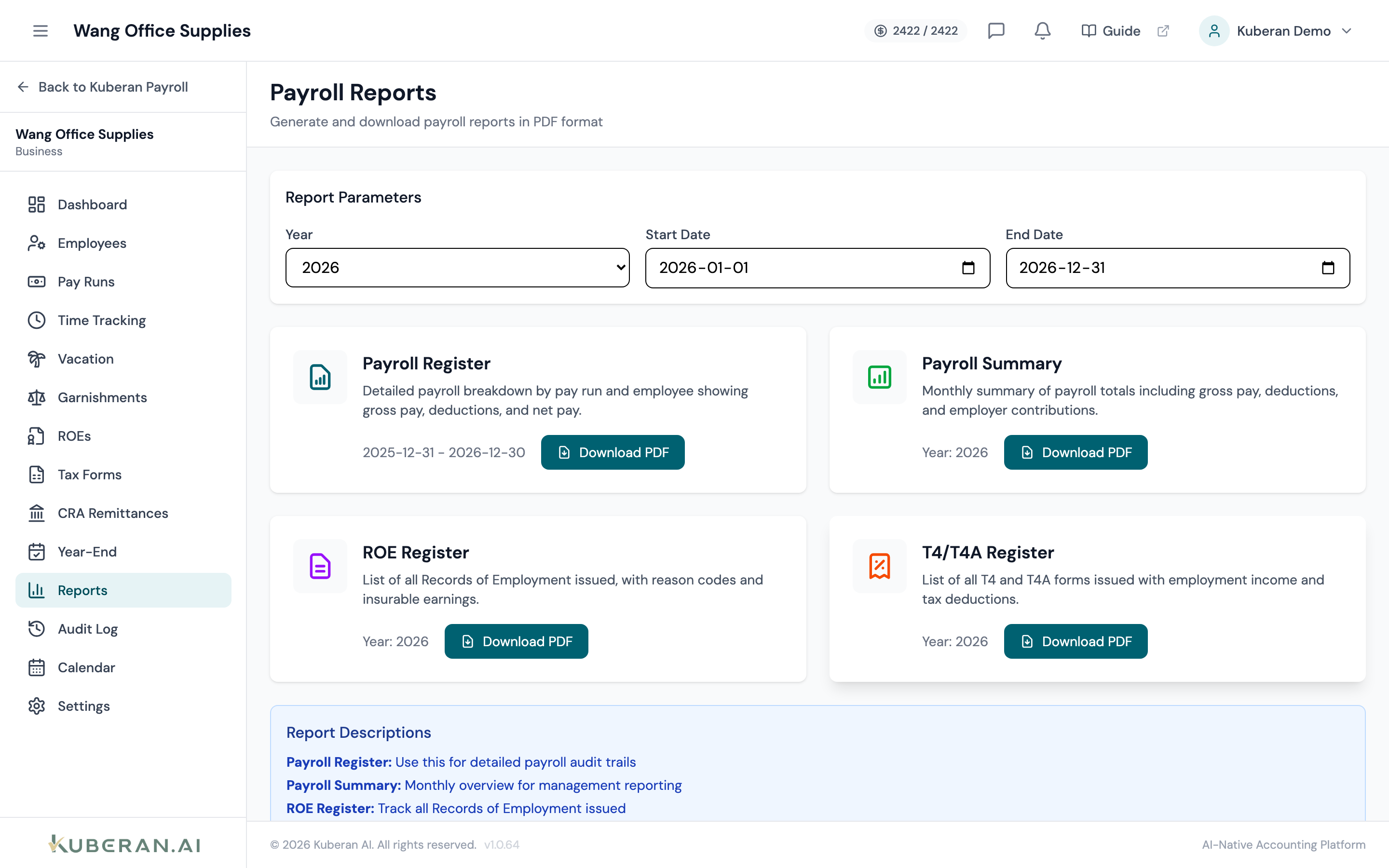
- (1) Payroll Register report card
- (2) Deductions Summary report card
- (3) Vacation Balances report card
- (4) T4 Summary report card
- (5) Date range filter and Export buttons
Available Reports
Payroll Register
The Payroll Register is a complete listing of every pay run within the selected date range, broken down by employee. It is the most detailed payroll report and the primary document used for reconciliation and audit purposes.
Columns: Pay Period, Employee Name, Employment Type, Regular Hours, Overtime Hours, Regular Pay, Overtime Pay, Gross Pay, CPP Employee, EI Employee, Federal Tax, Provincial Tax, Other Deductions, Net Pay, Pay Method.
Grouping options: Group by pay period (default), group by employee, or flat (ungrouped).
Use cases: Providing a payroll register to a client for their records, reconciling payroll costs to the general ledger, responding to a CRA audit request.
Deductions Summary
The Deductions Summary shows the total of every deduction type across all pay runs in the selected period. It includes both statutory deductions (CPP, EI, income tax) and voluntary deductions (benefits, RRSP, union dues, garnishments).
Columns: Deduction Type, Employee Total, Employer Match (if applicable), Grand Total.
Sub-report — Employer Payroll Costs: A companion view showing total gross pay plus employer CPP and employer EI, giving the true all-in payroll cost for the period. This is useful for management reporting and budget forecasting.
Use cases: Verifying remittance amounts against the CRA Remittances screen, tracking benefit deduction totals for the plan administrator, calculating total employer cost of payroll.
Vacation Balances
The Vacation Balances report shows the current accrued vacation balance for each employee as at the report date. It includes earned vacation, used vacation, and the remaining balance, expressed in both hours and dollars.
Columns: Employee Name, Accrual Rate (% or hours per year), Opening Balance (start of selected period), Earned During Period, Used During Period, Closing Balance, Dollar Value of Balance.
Important note: This report only reflects vacation tracked within Kuberan AI Payroll. If vacation time was managed outside the system in prior years, opening balances must be entered manually in the employee record before the report is accurate.
Use cases: Reporting vacation liability on the balance sheet, preparing for year-end accrual adjustments, confirming remaining vacation before an employee terminates.
T4 Summary
The T4 Summary report presents the aggregate totals that will appear (or have appeared) on the CRA T4 Summary form for the selected tax year. It is a read-only view of the year-end totals, distinct from the filing workflow in the Year-End Checklist.
Columns: Box number, Box description, Total amount across all employees.
Use cases: Quickly reviewing T4 totals without navigating to the Year-End section, providing a summary to the client for their records, cross-checking against CRA My Business Account balances.
Filters and Export
Select a start date and end date. The report includes all processed pay runs with a pay date within that range. Common presets: Current Month, Last Month, Current Quarter, Last Quarter, Year to Date, Last Year.
Available on Payroll Register and Vacation Balances. Filter to a single employee or a selection of employees. Default is All Employees.
Downloads the report as a comma-separated values file. Use CSV when you need to import data into Excel, a GL system, or any other tool for further analysis.
Generates a formatted PDF suitable for printing or sharing with the client. The PDF includes the workspace logo, client name, report date, and filter parameters applied.
Tips
- CRA audit requests typically ask for a payroll register for a specific period. Use the Payroll Register with the requested date range and export to PDF to respond quickly.
- Vacation liability should be reviewed at fiscal year-end. The dollar value in the Vacation Balances report can be used directly as the year-end accrual amount.
- Deductions Summary vs. Remittances screen: The Remittances screen tracks what has been remitted; the Deductions Summary shows what was deducted. These should match each period. Any gap indicates a remittance has not been recorded.